




The Problem
HAR files contain everything your browser sends and receives—passwords, API keys, tokens, emails, IP addresses. Support teams need them for debugging, but sharing them raw is a security nightmare. Manually editing is error-prone: miss one token in a 10MB file and you have a breach. Even automated tools can't catch everything—domain-specific secrets require domain-specific patterns.
The Solution
har-capture helps identify and remove common sensitive data patterns from HAR files while preserving their debugging value. Interactive review mode shows you what was flagged so you can verify before sharing. Extensible API lets you add custom patterns for your domain.
⚠️ Important: Use at Your Own Risk
har-capture is a development tool that helps identify common PII patterns. It is NOT a substitute for manual security review, domain-specific sanitization, or production security workflows.
This tool uses heuristics that cannot anticipate every pattern. Domain-specific secrets, proprietary formats, and unusual auth schemes may not be detected. You are responsible for verifying all sanitized output before sharing.
Always use interactive mode (--interactive) to review what was flagged. For production use, extend the detection patterns for your specific domain. Assume HAR files may still contain sensitive data after sanitization.
This tool reduces but does not eliminate the risk of PII exposure. Provided "as-is" under MIT License without warranty of any kind.
Guarda in azione
Capture and automatically sanitize HAR files with a single command:
$ har-capture get http://localhost:8080/api/user -o demo.har

============================================================
HAR CAPTURE
============================================================

  Target:     http://localhost:8080/api/user
  Browser:    chromium
  Output:     demo.har

Checking connectivity...
  Connected:  http://localhost:8080/

Checking authentication type...
  Detected: Form-based or no auth required

============================================================
CAPTURE COMPLETE
============================================================

  Compressed: demo.sanitized.har.gz
  Sanitized:  demo.sanitized.har
  Removed 3 bloat entries (7 -> 4)

Next steps:
  • Share the file (PII removed): demo.sanitized.har.gz
  • Validate for secrets: har-capture validate demo.sanitized.har.gz
Validation
Verify HAR files are safe to share:
$ har-capture validate demo.sanitized.har.gz

[OK] demo.sanitized.har.gz: Clean

Summary: 0 errors, 0 warnings
See how sensitive data is automatically detected and removed:
Original (Unlabeled Pipe Data)
var deviceConfig = '
  NETGEAR-C7000|
  192.168.0.1|
  admin|
  TK421_1977!|
  MatrixNet-5G|
  sk_live_a8f2k9m3p7x1n6v4b2|
  SN827194729|
  WPA3|
  10.31.41.5
';
var systemInfo = '
  Router7|
  GRID_NET_2024|
  00:1A:2B:3C:4D:5E|
  enabled|
  tok_1982flynn
';
Sanitized (PII Removed)
var deviceConfig = '
  NETGEAR-C7000|
  10.255.186.84|
  admin|
  FIELD_a8b9c0d1|
  MatrixNet-5G|
  FIELD_7b609581|
  SN: SERIAL_c1673a31|
  WPA3|
  10.255.186.84
';
var systemInfo = '
  Router7|
  GRID_NET_2024|
  02:21:96:a3:9b:4b|
  enabled|
  FIELD_9d8e7f6g
';
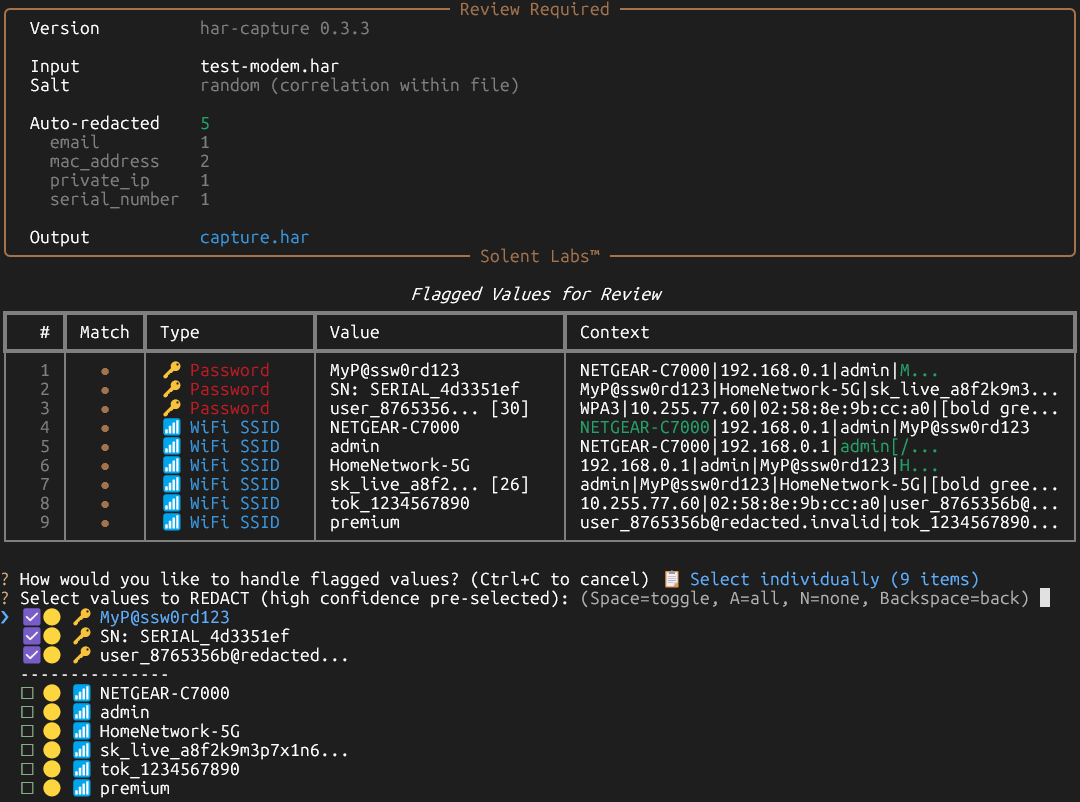
When ambiguous values are detected (like unlabeled pipe-delimited data), har-capture prompts for manual review:
Why It Matters
Security teams can share HAR files with vendors without exposing credentials.
Support teams can collect diagnostics from users safely and confidently.
Developers can automate HAR sanitization in CI/CD pipelines without dependencies.
One leaked API key can cost thousands in breach response. har-capture prevents that.
Caratteristiche chiave
- Rilevamento PII comuni (password, token, email, IP, MAC)
- Redazione che preserva il formato (mantiene dati di test validi)
- Hash che preservano la correlazione
- Zero dipendenze (solo stdlib)
- CLI e Python API
- Modalità revisione interattiva per verifica
Casi d'uso
- Team di supporto che raccolgono diagnostica dagli utenti
- Team di sicurezza che esaminano traffico web
- Automazione test con dati sensibili
- Report di bug che richiedono file HAR
Perché har-capture?
| Caratteristica | har-capture | Google har-sanitizer | Modifica manuale |
|---|---|---|---|
| Programmabile (API/CLI) | ✅ | ❌ | ❌ |
| Redazione che preserva il formato | ✅ | ❌ | ❌ |
| Mantenuto attivamente | ✅ | ❌ (Ultimo aggiornamento 2017) | — |
| Zero dipendenze | ✅ | ❌ (Python 2.7, Flask, etc.) | — |
Documentazione
Documentazione completa disponibile su GitHub
Installazione
Installa
pip install har-captureUtilizzo
# Cattura e sanifica con revisione interattiva
har-capture get https://example.com --interactive -o sanitized.har.gz

# Oppure sanifica file esistente
har-capture sanitize input.har -o clean.har

# Modalità revisione interattiva
har-capture sanitize input.har --interactive
from har_capture import sanitize_har
import json
# Sanifica dati HAR
with open('input.har') as f:
har_data = json.load(f)
clean_har = sanitize_har(har_data)
with open('clean.har', 'w') as f:
json.dump(clean_har, f)